


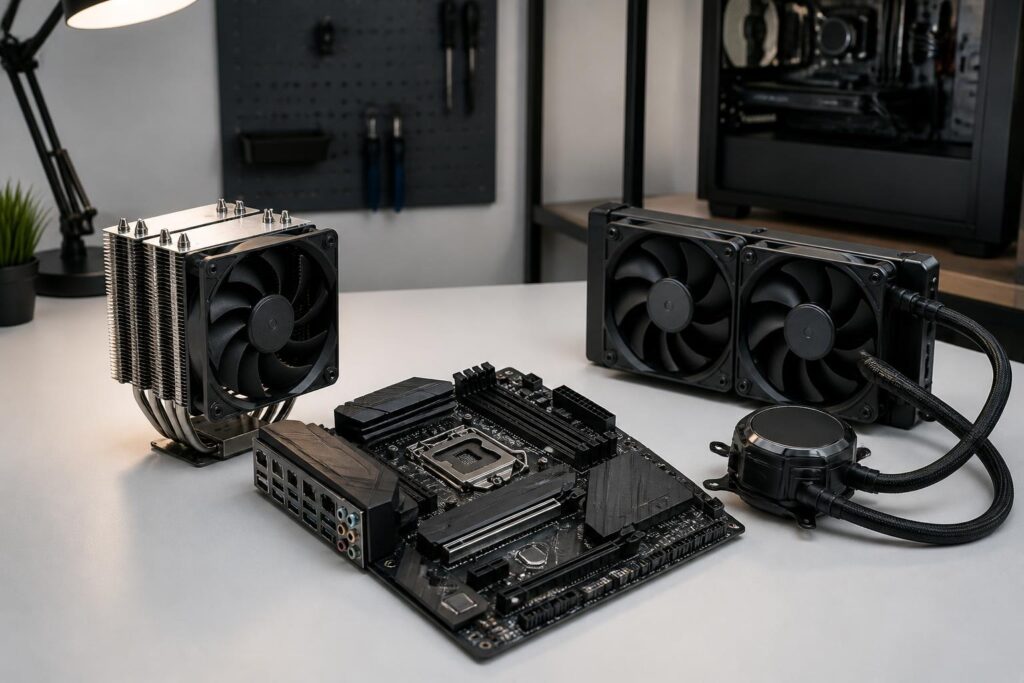
In a computer system, the central processing unit is often the component that generates a significant amount of heat when running demanding applications. An increase in CPU temperature is normal, but if the cooling system cannot meet the demand, the computer may reduce its clock speed to protect itself, operate unstably, or produce uncomfortably loud noise. Therefore, choosing a CPU cooler should not be based solely on the number of fans, the size of the radiator, or whether the design has lighting.
The two most common choices today are air cooling and closed-loop liquid cooling. Each type has its own advantages, limitations, and suitable user groups. A good-quality air cooler can handle many mainstream to high-end configurations, while liquid cooling often provides more space around the socket area and suits certain systems that need to maintain high performance for extended periods. However, liquid cooling is not automatically better in every situation.
Understanding the Role of a CPU Cooler
A CPU converts a large portion of its electrical power into heat during operation. When performing light tasks, the amount of heat generated is usually not significant. In contrast, compiling source code, rendering, processing video, running virtual machines, or gaming for extended periods can cause power consumption and heat output to increase considerably. The cooler’s job is to transfer heat from the CPU surface to a larger heat-dissipating medium, then release that heat into the air outside the computer case.
This process involves multiple components working together. The contact base transfers heat from the CPU to a metal block or contact plate. Cooling fins or a radiator expand the heat-exchange area. Fans push air through the cooling fins, while a pump in a liquid-cooling system moves coolant between the CPU block and the radiator. The final effectiveness depends not only on the cooler itself, but also on the thermal paste, installation method, airflow inside the case, and the motherboard’s power limits.
Air Cooling: Simple, Durable, and Easy to Manage
Air coolers usually consist of a contact base, an aluminum or copper fin assembly, and one or more fans. When the CPU heats up, the heat travels through heat pipes or the metal parts of the cooler, and the fan pushes it into the airflow inside the case. This design has no pump, liquid tubing, or separate radiator, so its structure is relatively simple.
The most obvious advantage of air cooling is convenient maintenance. Users mainly need to clean dust from the fan blades, cooling fins, and the case’s filters. If a fan wears out, replacing it is usually simpler than dealing with a system containing multiple interconnected parts. Air cooling also has no risk of liquid leakage because the design itself does not use circulating liquid.
Cost is another advantage, although air-cooler prices range from small models for office computers to large tower models designed for high-performance CPUs. For a mid-range processor and typical usage, a suitable air cooler can perform well without requiring investment in a more complex system. When the right size is chosen and it is installed correctly, an air cooler can also operate quietly in many situations.
The main limitations of air cooling are its physical size and compatibility. A large tower cooler may block the RAM slots, make it difficult to install expansion cards, or fail to fit within the width of the case. Fans can also become noisy when they have to spin quickly to handle sustained thermal loads. In addition, some high-power CPUs may require a more powerful cooling solution, especially when users want to maintain a continuous heavy load or raise the power limit.
Liquid Cooling: Flexible Placement, but More Components
Closed-loop liquid cooling, commonly known as AIO, uses a block mounted on the CPU, a pump, two tubes, and a radiator with fans. Heat from the CPU is transferred to the liquid, which moves to the radiator, where the fans blow the heat out of the case. Because the radiator is placed elsewhere, the area around the socket is usually more open than it would be with a large tower air cooler.
This design can suit cases where the space above the motherboard is limited by the RAM assembly or other components. It also allows users to position the radiator at the front, top, or another compatible location depending on the case design. For systems using high-performance CPUs during long workloads, a larger radiator may help maintain more stable temperatures, although the actual result still depends on product quality and overall airflow.
However, liquid cooling has multiple components that need to be considered together. The pump may produce its own humming noise, the fans still need to operate as they do in an air-cooling system, and the radiator must have a suitable mounting position. The system also depends on the durability of the pump and the connections. High-quality closed-loop coolers are designed for long-term operation, but they cannot be repaired as simply as replacing a fan. When the pump develops a problem or the system shows abnormal signs, users generally have to replace the entire unit or contact the warranty provider.
The risk of leakage is a common concern when discussing liquid cooling. With a genuine, closed-loop product installed according to the instructions, this is not a situation that occurs frequently during normal use, but buyers should still regard it as a design-related risk worth considering. Liquid cooling is also not a completely maintenance-free solution. Dust on the radiator, fan blades, and filters still needs to be cleaned regularly.
Do Not Choose Based on Fan Count or Radiator Size Alone
A larger radiator generally has more heat-exchange surface area, but that figure alone does not automatically guarantee a cooler system in every condition. Cooling performance is also influenced by fan speed, fin design, pump quality, contact pressure between the block and the CPU, and how the case brings in cool air and exhausts hot air. A large radiator installed in a position with poor airflow can still deliver disappointing results.
Similarly, a two-fan air cooler does not always outperform a well-designed single-fan model. An additional fan can improve the ability to push air through the cooling tower, but it also increases noise, slightly raises power consumption, and requires more clearance. Users should consider the overall design rather than relying on a single indicator to draw a conclusion.
Temperatures shown by software also need to be interpreted in context. A temperature measured during a few minutes of heavy load means little if the room temperature, type of workload, fan speed, and CPU power limit are unknown. More important questions are whether the computer can maintain stable performance, whether it experiences unusual clock-speed reductions, whether the fans continually ramp up and become uncomfortable, and whether the temperature returns to a reasonable level after the task ends.
Compatibility Matters More Than Appearance
Before buying, users need to check which CPU sockets the cooler supports. They should not assume that a newer model will be compatible with every platform, because the mounting mechanism, brackets, and screw-hole spacing may differ. Some products require a separate mounting kit for certain platforms, so checking the supported-platform list and included accessories is essential.
For a tower air cooler, the cooler’s maximum height must be lower than the limit allowed by the case. The fan size and the position of the cooling fins should also be checked against the height of the RAM modules. For liquid cooling, check the radiator dimensions, its total thickness when combined with the fans, the mounting position, and the routing of the tubes. A radiator that fits in length but is too thick can still interfere with the motherboard or nearby components.
The motherboard and fan controller also need to be taken into account. Multiple fans or a pump may require suitable connectors, a splitter, or a separate controller. If the system has lighting, users should check the connection standard and the motherboard’s synchronization capabilities rather than assuming that all connectors are the same. Planning ahead helps avoid buying a cooler that cannot be installed neatly or whose fan speed cannot be controlled as desired.
Choose According to Actual Usage Needs
For office computers, study computers, and mainstream gaming PCs, air cooling is usually a sensible choice thanks to its simple structure, manageable cost, and low maintenance requirements. If the CPU has moderate power consumption, the user does not overclock, and the case has basic airflow, buying a more expensive liquid cooler may not produce a proportionate difference.
People who frequently edit video, render images, compile large projects, or run multithreaded workloads for long periods may consider a large tower air cooler or a closed-loop liquid cooler. The final choice depends on the target temperature, case space, tolerance for noise, and maintenance preferences. With high-power CPUs, users should carefully examine the product’s cooling limits rather than relying solely on its name or advertising claims.
Liquid cooling may also be chosen for layout and aesthetic reasons. When users want more open space around the CPU, use a case with a convenient radiator-mounting position, or build a system in a particular style, an AIO may provide a suitable experience. However, appearance should not obscure questions about durability, warranty coverage, pump noise, and replacement costs after long-term use.
Common Installation Mistakes
One common mistake is leaving the protective film on the contact surface or applying too much thermal paste. The paste only needs to fill the very small gaps between the two surfaces, while heat-transfer effectiveness depends primarily on the contact surfaces and correct mounting pressure. The installer should also tighten the screws in the proper sequence, avoiding uneven tightening that causes the block or cooler base to make irregular contact.
Airflow inside the case also has a major impact. Cool air needs to be brought in, and hot air must have a suitable path to escape. Installing fans in the wrong direction or allowing cables to block intake and exhaust areas can reduce the effectiveness of both air and liquid cooling. After installation, users should check the fan speed, the pump speed if applicable, idle temperatures, and the computer’s behavior during a sustained workload.
With liquid cooling, the radiator’s position and the tube orientation should be considered to minimize unnecessary stress on the pump assembly or the creation of unusual noises. Because every case design is different, there is no single installation method that suits every system. The manufacturer’s instructions should take priority over decontextualized tips passed along by word of mouth.
Conclusion
Choosing a CPU cooler is a balancing act involving performance, noise, durability, compatibility, and budget. Air cooling suits users who prioritize simplicity, easy maintenance, and reasonable cost. Liquid cooling offers advantages in placement, radiator area, and the ability to handle certain heavy-load systems, but it comes with more components and requires more careful compatibility checks.
The most sensible approach is to start with the CPU, usage pattern, and existing case, then compare the design, fans, radiator, mounting hardware, and warranty policy. When the system is installed correctly, has proper airflow, and is cleaned regularly, both air and liquid cooling can provide a stable foundation for a computer intended to operate reliably over the long term.
