


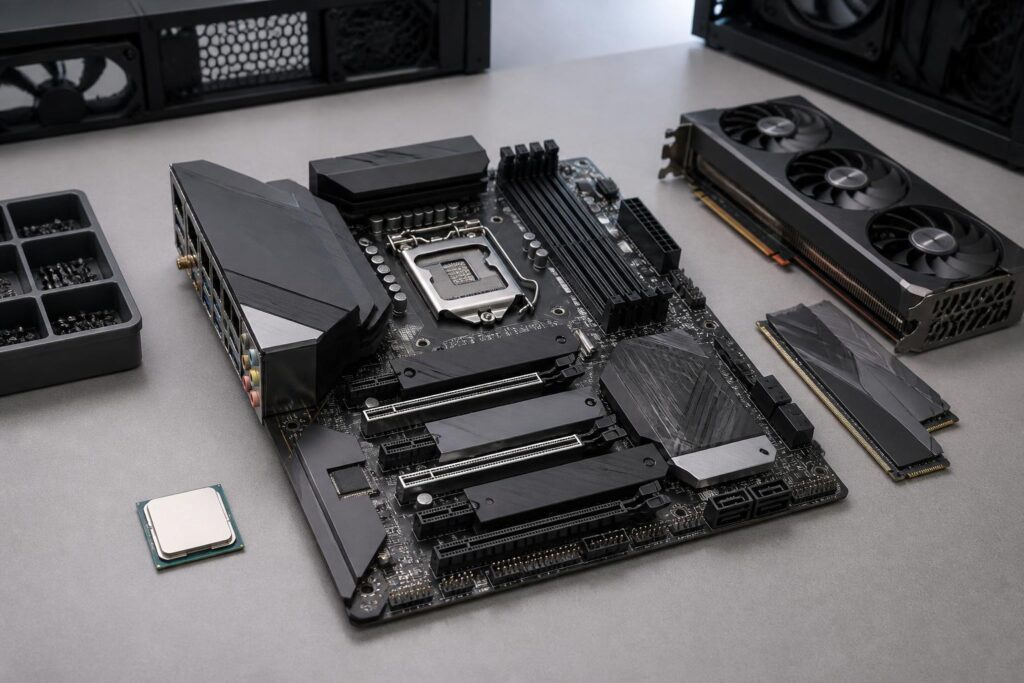
In a computer system, the motherboard often receives less attention than the processor, graphics card, or storage drive. However, it is the component that connects nearly every important part, from the CPU, memory, and storage devices to expansion cards and peripheral ports. The right motherboard does not necessarily have to be the most expensive model. More important is that it is compatible with the components you already have, provides enough features for your needs, and does not hinder future upgrade plans.
Many people choose a motherboard based on its brand or the number of slots it has without carefully checking the CPU platform, case size, power delivery capability, and required connections. This approach can easily lead to two situations: buying a model that is too limited and restricting the system, or spending heavily on features that will never be used. Understanding the motherboard’s role correctly will help make the computer-building process more balanced and less risky.
What Does the Motherboard Determine in a Computer?
The motherboard is the central circuit board where components communicate with one another through sockets, slots, buses, and integrated controllers. It does not generate most of the system’s processing performance itself, but it can determine which CPUs the computer can use, which connection standards it supports, and how far the system can be expanded.
First, the motherboard must be compatible with the processor. Each CPU line uses a particular socket and platform. Even if two processors have the same number of pins or come from the same manufacturer, they may not use the same motherboard. Compatibility also depends on the chipset, firmware version, and the manufacturer’s support policy. Therefore, you should not simply look at the socket name and conclude that every CPU using the same socket will work in the same way.
The motherboard also determines the number and types of slots for memory, graphics cards, storage drives, network cards, and other expansion devices. Higher-end models often feature multilayer circuit-board designs, stronger power-delivery systems, and more connection ports. Meanwhile, mainstream models may work well for office computers or mid-range gaming PCs but may not be suitable for systems that require high power over extended periods.
Start with the CPU and Intended Use
The most sensible approach is to choose the processor first and then find a compatible motherboard. If you already have a CPU, you need to check the socket, the list of supported processors, and the minimum required firmware version. If you are building a new computer, you should also consider the platform’s upgrade path rather than focusing only on the CPU model you are buying.
For office work, study, and everyday tasks, a mainstream motherboard with enough memory slots, suitable display outputs, and the necessary number of USB ports will usually be sufficient. A computer used for photo editing, video production, programming, or gaming may require a more stable power-delivery system, more high-speed storage slots, and greater convenience when installing expansion cards.
For computers that run demanding workloads for long periods, choosing a motherboard requires even more care. A CPU with high power consumption places considerable stress on the power-delivery circuitry and the cooling system around the socket area. A low-cost model may still boot successfully, but its ability to maintain stable clock speeds, component temperatures, and long-term durability are separate issues that need to be considered.
Chipset and Power Delivery: Two Factors You Should Not Overlook
The chipset is commonly used to distinguish motherboard market segments. It affects the number of connection lanes, expansion features, overclocking support on some platforms, and the number of ports that the manufacturer can implement. Not every difference between a high-end and mainstream chipset directly translates into performance, but those differences can become important when users need multiple storage drives, several expansion cards, or advanced management features.
The power-delivery circuitry, often discussed in terms of its VRM design, is responsible for converting and stabilizing the voltage supplied to the CPU. Buyers should not look only at the advertised number of phases, because component quality, cooling, and the overall design also affect real-world results. Large VRM heatsinks with good contact and sensible placement can help this area operate more reliably when the CPU is under heavy load.
This does not mean every computer needs a motherboard with an extremely large VRM. A power-efficient CPU used for office work does not require the same level of investment as a high-performance processor. The appropriate principle is to choose power delivery with reasonable headroom for the CPU rather than paying for a configuration far beyond your needs.
The Size Must Match the Computer Case
Motherboards come in several different sizes, with common form factors including ATX, microATX, and Mini-ITX. Size affects not only the number of slots but also whether the motherboard will fit inside the case. A large motherboard placed in a small case may be impossible to install, while a small motherboard in a large case will still work but may leave much of the available expansion space unused.
ATX generally provides more slots and a more spacious layout, making it suitable for computers that need multiple cards or storage devices. microATX is a balanced choice for many home systems because it is more compact while still offering the most common connections. Mini-ITX is designed for small-form-factor computers, but installation and upgrades usually require more careful planning because space is limited.
Before buying, you should check the case’s supported specifications, mounting-point locations, the space available for the CPU cooler, and the clearance around the graphics card. A motherboard that fits the case dimensionally can still make installation inconvenient if its ports or power connectors are difficult to access.
Check Slots and Connections Based on Your Actual Needs
The number of slots on a motherboard should be evaluated according to the devices you will use, not according to the idea that more is always better. Those installing a dedicated graphics card need to check the position of the PCI Express slot, the spacing between slots, and whether the card will occupy multiple slots. If you plan to add a sound card, network card, or capture device, the remaining slots must also be taken into account.
For storage, check the number of M.2 slots, the protocols they support, and how those slots share lanes with SATA ports or other expansion slots. Some motherboards may disable certain ports when a device is installed in a particular slot. This is not a design flaw, but users need to know about it in advance to avoid buying several drives and then discovering that they cannot all be used simultaneously in the desired way.
The rear-panel ports also deserve attention. High-speed USB ports, network ports, audio ports, display outputs, and connectors for wireless antennas can differ considerably between models. If you frequently use external hard drives, audio interfaces, capture devices, or multiple monitors, you should make a list of the ports you need before choosing a motherboard. Additional adapters can sometimes solve a shortage, but they also increase costs and the number of accessories on your desk.
Firmware, Upgradeability, and the Installation Experience
The motherboard’s firmware, commonly called BIOS or UEFI, helps the system recognize hardware and provides basic configuration options. A motherboard with a firmware-update feature that does not require a compatible CPU can be useful when users buy a new platform whose initial firmware version does not yet support the corresponding processor. However, the specific feature depends on the manufacturer, so you should check the product documentation rather than infer its capabilities from the name alone.
Upgradeability is also related to the number of unused memory slots, the number of available storage slots, and the space inside the case. If you are installing only one storage device now but expect to expand later, you should choose a motherboard with a convenient layout and sufficient connection lanes. A system may not need an immediate upgrade, but preparing a reasonable amount of headroom is often more cost-effective than replacing the entire platform within a short period.
Details such as fan headers, front-panel USB connectors, an integrated I/O shield, and the locations of power connectors also affect the installation experience. They do not add performance, but they make cable management neater, maintenance easier, and reduce the risk of cables becoming strained or blocking fans. For first-time builders, the manufacturer’s installation diagram is more practically valuable than generic advertised specifications.
Balance the Budget Instead of Chasing High-End Models
Motherboard prices increase based on factors such as the chipset, power-delivery quality, number of ports, wireless connectivity, expansion capability, and cooling design. Not every price difference provides a clear benefit for every user. If the computer is used only for office work, entertainment, and a few common applications, the budget may be better spent on a suitable CPU, memory, storage drive, or monitor rather than on an unnecessarily overbuilt motherboard.
Conversely, cutting costs too aggressively can create inconveniences later. A motherboard with too few ports, only enough storage slots for current needs, or power delivery operating close to its limits can make upgrades difficult. A good way to balance the budget is to identify three groups of needs: what you need immediately, what you may need over the next few years, and features you will not use at all. The budget should focus on the first two groups.
Buyers should also consult the official technical documentation for the specific motherboard model, including the list of supported CPUs, lane-sharing diagrams, dimensions, port types, and the limitations of each slot. This is a small step, but it helps avoid choices that appear compatible on paper yet do not suit the actual configuration.
Conclusion
The motherboard is the platform that links the entire computer together and significantly shapes the system’s long-term usability. Choosing correctly does not mean buying the model with the most features; it means finding a product that is compatible with the CPU, fits the case, has suitable power delivery, and provides enough connectivity for both current needs and future upgrade plans.
The evaluation process should begin with the processor, followed by the chipset, size, expansion slots, connection ports, firmware, and upgradeability. When users assess these factors according to their actual needs instead of looking only at the brand name or price, they can build a more balanced configuration. A good motherboard is the quiet foundation that ensures the other components can perform as intended and helps prevent the computer from quickly becoming outdated because of limitations that could have been anticipated from the start.
