


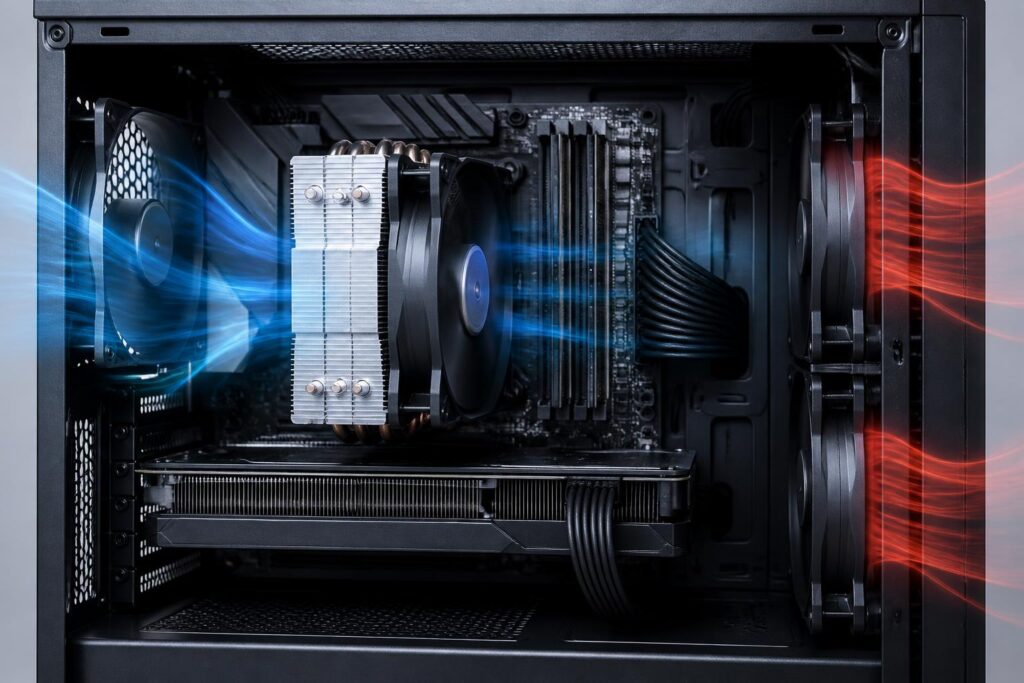
Why is CPU cooling an important part of a computer?
A CPU performs millions of calculations in a very short time, so it constantly generates heat during operation. When running light tasks, this amount of heat is usually not a major problem. However, when editing video, playing games, processing data, running virtual machines, or using multiple applications at the same time, the CPU may operate at high intensity for long periods. If the heat is not transferred away effectively, the computer may become hot, noisy, and less stable.
CPU cooling is responsible for receiving heat from the processor, transferring it through a heat-conductive material, and then releasing it into the environment outside the computer case. A suitable cooling system helps the CPU maintain a reasonable temperature, limits performance reduction caused by heat, and enables the computer to operate more stably. Nevertheless, good cooling does not mean that you must choose the largest or most expensive device. The right decision should be based on the type of CPU, the space inside the computer case, usage needs, and the overall ventilation capability.
Two common types of cooling solutions
Air cooling
Air coolers usually consist of a base that contacts the CPU, heat pipes, an aluminum fin stack, and a fan. Heat from the CPU surface is transferred to the fins, after which the fan pushes air through them to carry the heat away from the heatsink. This design is relatively easy to understand and does not require a pump or circulating liquid, so it is often chosen by people who want a simple, easy-to-maintain system.
Notable advantages of air cooling include durable operation, familiar installation, and few moving parts apart from the fan. A suitable cooler can effectively handle office computers, mainstream gaming PCs, and many systems used continuously for work. One point to note is that the size of the heatsink can affect the space available for RAM modules, expansion cards, or the side panel of the case. Some larger models may also feel cumbersome in terms of layout, although they do not necessarily cause problems if the case and motherboard are compatible.
Closed-loop liquid cooling
Closed-loop liquid cooling, commonly called an all-in-one (AIO) water cooler, uses a contact block mounted on the CPU, a pump, tubes, and a fan-equipped radiator. Liquid circulates in a closed loop to carry heat from the CPU area to the radiator, where fans help release the heat. These coolers come with radiators in various sizes, making them suitable for different types of cases and power levels.
Liquid cooling can provide more open space around the CPU area because most of the cooling mass is located at the radiator. This design is also often considered for computers with CPUs that generate substantial heat or for builds where the appearance of the interior is a priority. However, it includes a pump and connections, so users need to pay attention to compatibility, installation, and operating condition over time. Liquid cooling should not be viewed as the default choice for every computer, since a suitable air cooler can still meet many needs effectively.
Factors to consider before buying
CPU thermal characteristics
First, determine whether the CPU belongs to the energy-efficient, mainstream, or high-performance segment. Processors that frequently operate under heavy loads need a solution with a corresponding ability to handle heat. If the computer is used only for web browsing, working with documents, and watching online content, a basic cooler may be sufficient. Conversely, a computer used for video editing, image rendering, software compilation, or long gaming sessions should be equipped with greater care.
Power specifications should not be considered separately from usage conditions. The actual temperature of the same CPU can vary depending on the motherboard, power limits, system settings, room temperature, and airflow inside the case. Therefore, choosing a cooler based only on the product name without checking compatibility may lead to unexpected results.
Compatibility
The cooler’s base must support the correct socket on the motherboard. This is a basic requirement but can easily be overlooked when users purchase components at different times. In addition to the socket, check the maximum height allowed by the case, the radiator dimensions if choosing an AIO, fan mounting positions, and the clearance around the RAM slots.
With large air coolers, examine the distance between the heatsink and nearby components. An excessively wide design may block the RAM slots or make assembly more difficult. With liquid coolers, determine whether the case supports a suitable radiator mounting position, and also consider the tube routing to avoid placing unnecessary stress on the connectors. Compatibility is not merely about fitting the components together; it must also allow the fans and cables to be arranged properly.
Noise levels and fan quality
Fans are usually the component that produces the most noticeable noise in a cooling system. When the CPU becomes hot, the fans may speed up to handle the greater amount of heat. A well-configured system adjusts fan speed according to temperature rather than always operating at a high level. Users should pay attention to bearing quality, speed range, control capability, and blade design instead of looking only at the number of fans.
More fans do not necessarily mean that the computer will be cooler. Fans need to be arranged to create directional airflow, typically drawing cool air in from the front or bottom and pushing hot air out through the rear or top. A case with an overly closed front panel, clogged dust filters, or cables blocking the airflow path can all reduce the effectiveness of a good cooler.
Proper installation is just as important as choosing the equipment
The contact surface between the CPU and the cooler base must be clean, flat, and securely mounted. Thermal paste helps fill the microscopic gaps between the two surfaces, thereby supporting heat transfer. The amount of paste should not be so small that it fails to cover enough of the surface, but there is no need to apply too much either. The important thing is to follow the manufacturer’s instructions and tighten the screws in the proper order so that pressure is distributed evenly.
Before finishing, check whether the fan or pump is connected to the correct header on the motherboard. Cables should be secured neatly so that they do not touch the fan blades or obstruct airflow. With liquid cooling, the radiator and tubes must be positioned in the direction recommended by the manufacturer. After starting the computer, observe the fan speed, pump speed if applicable, temperature when the computer is idle, and its response when running a demanding task.
Maintain the system to prevent performance loss
Dust is one of the common causes of a cooling system gradually becoming less effective. Dust accumulated on aluminum fins, filters, and fan blades reduces the amount of air passing through. Depending on the environment where the computer is placed, users should inspect it regularly and clean it with suitable tools. Before cleaning, shut down the computer, disconnect the power, and avoid applying excessive force to the fans or motherboard.
Room temperature, the location of the case, and the clearance around it also have a noticeable impact. Placing the computer against a wall, inside an enclosed compartment, or near a heat source will make it harder for hot air to escape. If the computer becomes noisier than before, its temperature rises unusually, or performance drops during tasks that previously ran normally, check for dust, cables, fans, and the cooler’s contact surface instead of immediately replacing a component.
Choose according to your needs instead of chasing specifications
For office and school computers, the priorities should be low noise, simple installation, and reliability. A solution that is sufficient for the task will save money while avoiding the use of an excessively large cooler for a CPU that is not frequently under heavy load. Gaming computers require a balance between temperature, noise, and interior space, especially when the user also installs a high-power graphics card.
Professional workstations should be assessed based on the duration of continuous workloads. If the computer is frequently used for rendering, simulation, or data processing for many hours, the cooling system and airflow should be considered as a whole together with the power supply, case, and motherboard. In all cases, the cost of purchasing the equipment is only one part of the decision. The ability to install it correctly, clean it conveniently, and maintain stable operation over the long term also deserves consideration.
Conclusion
CPU cooling is the foundation that helps a computer maintain performance and stability, but there is no single choice suitable for every configuration. Air cooling is generally suitable for people who need a simple, easy-to-maintain design, while closed-loop liquid cooling can meet different requirements for space and workload. Before buying, check the CPU’s characteristics, compatibility standard, case dimensions, fan quality, and ability to create effective airflow.
A cool system does not come only from an expensive cooler. Careful installation, regular cleaning, placing the computer in a well-ventilated location, and setting appropriate fan speeds all make important contributions. By choosing based on actual needs rather than chasing appearance or isolated specifications, users can build a computer that is stable, quiet, and easy to use over the long term.
