


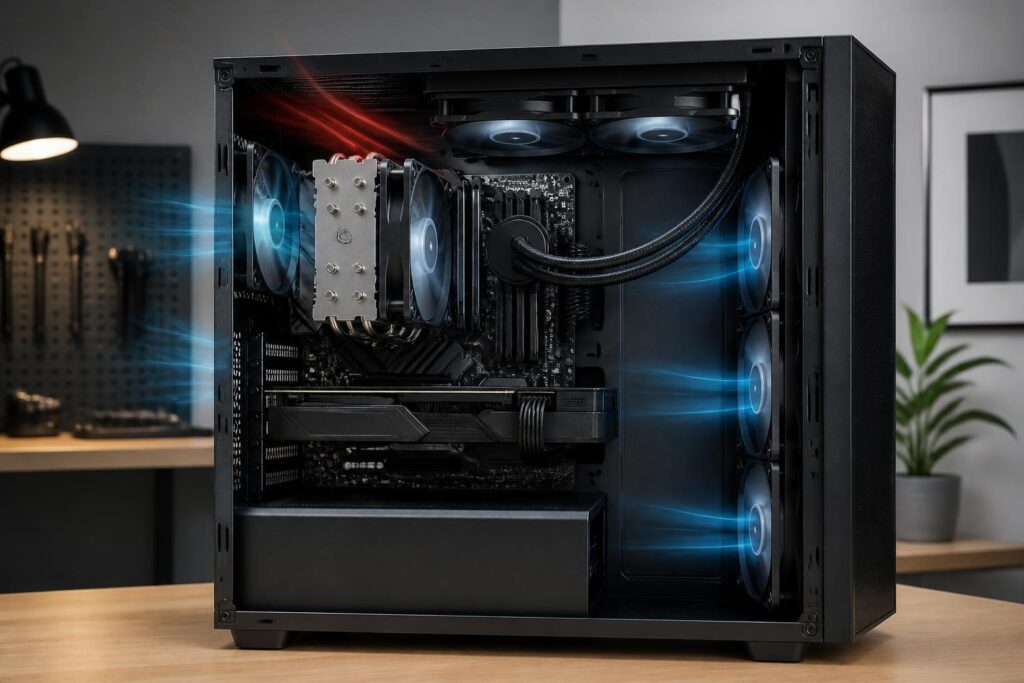
When assembling a computer, many people focus only on the processor, motherboard, or graphics card, while the cooling system is often considered a secondary component. This perspective can easily lead to a configuration with high theoretical performance but unstable operation, excessive noise, or rapid performance reductions when handling heavy workloads for extended periods. CPU cooling does not add computing power, but it determines the processor’s ability to maintain the performance level it is designed to deliver.
Choosing the right cooler is not simply a matter of finding the largest product or the one with the most fans. Users need to consider the CPU’s thermal power, the case’s limitations, socket compatibility, intended use, and noise requirements. A good air cooler may be more suitable than liquid cooling for an office computer, while an AIO system has certain advantages in high-end configurations that require more open space around the socket area.
Why does cooling directly affect the user experience?
During operation, the CPU converts a large portion of its electrical power into heat. When heat is not removed from the chip’s surface quickly enough, the temperature rises and the processor may automatically adjust its clock speed to protect itself. This phenomenon is commonly called thermal throttling. Users may notice that the computer still opens applications normally, but rendering, compiling, data compression, or other long-running tasks are less stable than expected.
Prolonged high temperatures also increase demands on the fans and make noise more noticeable. When fans must spin faster to compensate for limited cooling capacity, the experience of working, gaming, or recording audio at home can all be affected. Conversely, a properly arranged cooling system allows the fans to operate at lower speeds in many situations while maintaining stable performance as the load increases.
How are air cooling and AIO liquid cooling different?
Air cooling is suitable for simplicity and easy maintenance
Air coolers use a contact base, heat pipes, heatsink fins, and fans to transfer heat from the CPU into the air inside the case. The clearest advantage of this solution is its relatively simple construction. With no water pump or liquid tubing, users have fewer components to worry about beyond the fans. Installation, inspection, and cleaning are also generally more accessible.
The disadvantages of air cooling lie in its size and the way it occupies space. Some models have large fin stacks that may cover RAM slots or make installation difficult in a narrow case. The cooler’s height must also fall within the limits specified by the case manufacturer. Therefore, users should not look only at product images; they need to check the actual dimensions and the clearance around the socket before buying.
AIO liquid cooling creates more open space around the CPU
AIO liquid cooling transfers heat from the contact base to a radiator through liquid circulating in a closed system. The pump block sits on the CPU, while the radiator and fans are placed elsewhere in the case. This arrangement reduces obstruction around the socket from a large fin stack and provides more options for arranging components.
However, an AIO is not the default choice for every computer. Both the pump and fans can produce noise, while the system includes additional components that require monitoring. Pump lifespan, fan condition, and radiator placement all affect real-world results. Users also need to determine clearly what radiator size can be installed at the front, top, or rear of the case. A large AIO placed in a cramped position or obstructing airflow may not deliver the desired performance.
Assessing requirements before choosing a cooler
For office computers, study systems, and light tasks, a well-compatible air cooler is usually sufficient. What matters is that the cooler is mounted securely, the fan does not make unusual noises, and the case has a reasonable airflow path. Spending much more on a complex cooling system in this situation may not produce a proportionate difference.
Gaming computers need to be evaluated based on both the CPU and the graphics card. Many games cause the graphics card to generate substantial heat, so upgrading only the CPU cooler while ignoring overall airflow will not solve thermal problems inside the case. For computers frequently used for video rendering, compiling large projects, running virtual machines, or processing data for extended periods, the ability to sustain performance continuously should take priority over temperature results during the first few minutes.
Processors with high power limits or those configured to operate at high performance levels need a correspondingly capable cooling solution. Nevertheless, users should not evaluate a cooler solely based on labels such as “high-end” or “high performance.” Actual power consumption also depends on the motherboard, power limits, BIOS version, and the manufacturer’s default configuration. It is better to review the cooler’s compatibility specifications, check its dimensions, and leave some headroom rather than choosing one that is right at the limit.
Compatibility matters more than appearance
Before buying, users need to check whether the cooler supports the CPU’s socket. Some products can be used with multiple platforms but require a separate mounting kit or a different installation procedure. If the cooler has been stored for a long time, users should also confirm that all the included accessories needed for the platform in use are present.
Physical clearance is an easily overlooked factor. An air cooler may conflict with tall RAM modules, expansion slots, or the side panel of the case. A liquid cooler, meanwhile, needs space for the radiator, fans, and tubing. When installing a radiator at the front, users should check whether its position affects the amount of cool air entering the graphics card. When installing it at the top, they need to verify the clearance from the motherboard and the connectors along the top edge.
Fans should also be considered as part of the system. Larger size does not necessarily mean higher effectiveness in every situation, because performance also depends on rotational speed, static pressure, fan blade design, and control methods. A fan running quickly whose airflow is blocked by a closed front panel or an excessively dirty dust filter cannot perform to its full potential.
Thermal paste and installation methods
Thermal paste fills the tiny gaps between the CPU surface and the cooler base, where air could reduce heat-transfer capability. Too little paste can create uneven contact areas, while too much is not always better. Users should follow the manufacturer’s instructions, keep the surfaces clean, and avoid touching the contact base with their hands after cleaning it.
Mounting pressure also affects performance. Screws or mounting clips should be tightened in a reasonable sequence; users should not forcefully tighten one side while the other has not yet been positioned. The cooler must sit firmly, remain level, and not place abnormal force on the motherboard. After installation, users should check whether the fan or pump cable is connected to the correct header and ensure that the cable does not touch the fan blades.
Replacing thermal paste does not necessarily need to follow a rigid schedule. When temperatures rise abnormally, the cooler has been removed for cleaning, or the paste has dried out and is no longer distributed evenly, it is time to apply new paste. If temperatures change noticeably after reinstalling the cooler, users should check the mounting pressure, dust, and fan speed rather than blaming only the type of paste.
Case airflow should be considered as a system
Even a good cooling configuration can perform poorly if hot air is not expelled. A common arrangement is for fans at the front or bottom to bring in cool air, while fans at the rear or top push hot air out. The goal is not to create the largest possible number of fans, but to establish a relatively clear airflow path and limit hot air from circulating around the CPU and graphics card.
Dust on filters, heatsink fins, and fan blades reduces airflow over time. Therefore, regular cleaning is no less valuable than purchasing expensive equipment. When cleaning, users should shut down the computer, disconnect the power, and hold the fan blades so they do not spin freely due to strong airflow. There is no need to remove all components if the only task is to clean the filters and areas that easily collect dust.
Should temperature, noise, or upgradeability take priority?
There is no single criterion suitable for every user. People working in quiet environments may prioritize a cooler that operates quietly under moderate loads, even if temperatures are slightly higher than those of a maximum-performance configuration. Those who frequently run demanding tasks may accept louder fan noise in order to maintain performance. For compact computers, size and component accessibility may matter more than the cooler’s appearance.
Upgradeability also deserves attention. A cooler that supports multiple platforms, has replacement accessories, and uses commonly available fans will be more convenient when users change CPUs or need to replace a fan later. With an AIO, the warranty policy and clarity of the support process deserve even more consideration because users cannot replace individual components as simply as they can with an air cooler.
In summary, choosing a CPU cooler is a balancing act between power, space, noise, reliability, and actual usage patterns. Air cooling is suitable for people who want a simple, easy-to-maintain system; AIO liquid cooling can provide a more flexible arrangement for powerful configurations but requires more careful checking of installation position and durability. When a compatible cooler is combined with correctly applied thermal paste, proper airflow, and regular cleaning habits, the computer will have a more stable foundation instead of merely achieving attractive temperatures in a short benchmark.
