


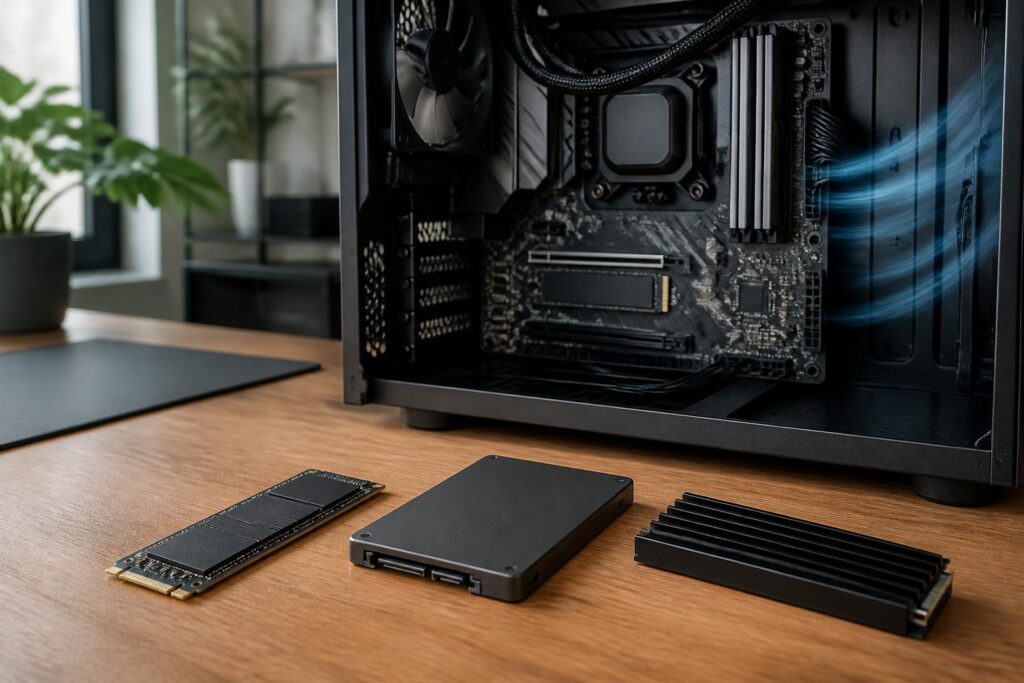
SSDs have become one of the components with the clearest impact on the way a computer feels to use. From operating system startup times and application launch speeds to handling photo, video, and game libraries, a suitable storage device can make the entire system feel more responsive. However, the market now offers a wide variety of SSD models with different connection standards, capacities, and prices. Choosing a product based solely on the highest advertised read and write speeds can lead to spending more money without receiving a proportionate benefit.
The right SSD is not necessarily the fastest model. It is a device that matches the workload, is compatible with the computer, offers sufficient capacity, and maintains stable performance over the long term. General users, gamers, content creators, and small businesses may have very different requirements. Therefore, before buying, it is important to view an SSD as part of the entire system rather than as an isolated component.
The Connection Standard Determines the Initial Limit
The two most common groups of SSDs today are 2.5-inch SSDs using the SATA interface and M.2 SSDs using the PCI Express interface through the NVMe protocol. SATA SSDs generally have a form similar to traditional 2.5-inch hard drives and connect to the motherboard with a data cable and a power cable. They are an easy upgrade option for many older computers, especially systems that do not have a suitable M.2 slot.
M.2 NVMe SSDs are more compact and connect directly to the motherboard. Thanks to the bandwidth of PCI Express, these devices generally offer higher data transfer speeds than SATA, especially when handling sequential read and write operations or multiple simultaneous requests. However, the ability to take advantage of that speed also depends on the number of PCI Express lanes, the generation of the interface supported by the motherboard, the processor, and the design of the SSD itself.
Not every M.2 slot is the same. Some slots support only SATA SSDs, while others are intended for NVMe drives. Some motherboards share bandwidth between the M.2 slot and certain SATA ports or expansion slots. If users do not check the motherboard documentation, they may purchase the correct type of SSD but be unable to install it, or temporarily disable another port. This compatibility check should be completed before comparing prices.
Capacity Should Be Calculated According to Actual Use
A small-capacity drive may be suitable for an office computer that runs only the operating system and a few basic applications, but it will quickly become cramped when users install games, store high-resolution photos, or work with video. When a drive is nearly full, the free space available for temporary files, cache, and internal maintenance operations is reduced. This can affect performance in some situations and make data management inconvenient.
Rather than calculating capacity only for current needs, users should reserve space for several years of use. Data can be divided into three groups: the operating system and frequently used software, work data that needs quick access, and infrequently used archival storage. High-speed SSD storage should be allocated to the first two groups, while long-term data can be moved to a higher-capacity SSD, a mechanical hard drive, or a suitable backup device.
Choosing a single large-capacity drive is not always the best approach either. Two separate drives can help keep the operating system apart from work data, making it more convenient to reinstall the operating system or change the configuration. However, this arrangement is meaningful only when users actually have a backup plan. Dividing data among multiple partitions or drives does not mean that the data is protected against hardware failure.
Do Not Equate Advertised Speed with Everyday Experience
Sequential read and write speed specifications are often prominently displayed on product packaging. These figures are useful when continuously copying large files, such as video projects or high-capacity data libraries. However, many everyday activities involve small files, random operations, and multiple requests occurring at the same time. In those situations, latency, queue-handling capability, and firmware quality also have a significant effect on the user experience.
Computers used for web browsing, writing, studying, and opening applications generally do not fully exploit the differences between high-end NVMe SSDs. The difference may be more noticeable when building large software projects, editing video, working with virtual machines, or frequently transferring large datasets. Therefore, buyers should identify their primary tasks instead of paying extra simply to obtain the highest number on the specification sheet.
Sustained performance is just as important as initial speed. Some SSDs can reach high transfer rates for a short time with the help of cache memory, but their speed may change when they must continuously write large amounts of data or when the drive has been heavily used. This is not always an issue for general users, but it can affect people who frequently export videos, copy large amounts of data, or run demanding applications continuously.
Cache, NAND Type, and Endurance
Inside an SSD, the controller, NAND memory chips, and firmware work together to store data. Buyers do not need to memorize every technical detail, but they should understand that equal capacity does not mean that products will perform identically. The controller design, cache, thermal management, and firmware all contribute to determining real-world performance.
Manufacturers often publish a total bytes written rating, which is commonly used as a reference for an SSD’s endurance. This figure is not a promise that the drive will fail immediately after passing a specific threshold, nor does it replace the need for backups. It should be viewed as a comparison criterion among models in the same segment and intended for the same purpose. For ordinary users, choosing a product with clear specifications, appropriate warranty coverage, and a trustworthy source is often more important than pursuing the type of memory advertised as the newest.
SSDs also need free space to operate effectively. The controller must distribute data, clean up blocks that are no longer in use, and balance the number of writes across memory areas. The operating system’s TRIM feature and the firmware help this process run more smoothly, but users should still avoid keeping the drive nearly full at all times. Reserving some spare capacity can help ensure more stable operation over the long term.
Temperature and Installation Location Should Not Be Overlooked
High-speed NVMe SSDs can generate considerable heat when transferring data continuously. As temperatures rise, the device may automatically reduce its speed to protect the components. This phenomenon usually does not appear during light tasks, but it can occur when copying large files, rendering video, or running extended benchmarks. Therefore, the location of the M.2 slot, airflow inside the case, and the heatsink included with the motherboard all deserve attention.
An SSD should not be installed in a position blocked by a graphics card or directly in a hot-air zone without an appropriate airflow solution. If the motherboard has multiple M.2 slots, the manual may indicate which slot is preferred or equipped with a heatsink. Laptops have their own limitations regarding dimensions, thickness, and heat dissipation, so checking the available installation space is mandatory before buying.
Three Common Mistakes When Buying an SSD
The first mistake is looking only at the maximum read and write speeds. These figures are usually measured under specific conditions and do not reflect all everyday operations. The second mistake is choosing a capacity that is too close to current needs. A drive that is just large enough for today’s operating system can quickly fill up after additional software is installed, updates are downloaded, and personal data is stored.
The third mistake is treating an SSD as the only backup location. An SSD can fail because of component defects, electrical problems, firmware errors, or physical damage. When important data exists on only one device, the risk of loss remains, even if that device is an expensive SSD. Files that cannot be replaced should have an additional copy on another device or in another location, and the ability to restore them should be checked periodically.
In addition, buyers should be wary of products with unclear origins, inconsistent technical information, or ambiguous warranty terms. A low price may be attractive, but data recovery costs and work disruption are often greater than the initial savings. A suitable product should also come with verifiable origin, a clear return policy, and reliable after-sales support.
How to Build a Balanced Choice
The SSD selection process can begin with four questions: What interface does the computer support? How much capacity will be needed over the next few years? Is data written frequently? And what is the upgrade budget? Only then should users compare performance, endurance, thermal characteristics, and warranty coverage among compatible products.
For an office computer or an older machine, a SATA SSD may be a reasonable choice if the main goal is to improve responsiveness compared with a mechanical hard drive. For a newer computer with an M.2 NVMe slot, users can choose a mid-range product with ample capacity instead of a high-end model with limited capacity. Content creators should prioritize sustained performance, write endurance, and supplementary storage options. Gamers should pay more attention to the size of their game library, temperatures when loading data, and future upgrade potential than to sequential speed alone.
Choosing an SSD is a balancing act involving speed, capacity, endurance, temperature, and compatibility. A drive that is fast but too hot, too small, or unsupported by a backup plan is not necessarily a good choice. By assessing their overall usage needs and considering the SSD in relation to the motherboard, operating system, power supply, and data-management habits, users can avoid costly but unnecessary upgrades. The ultimate goal is not to own the most impressive specifications, but to have a system that remains responsive, stable, and safe for data over the long term.
