


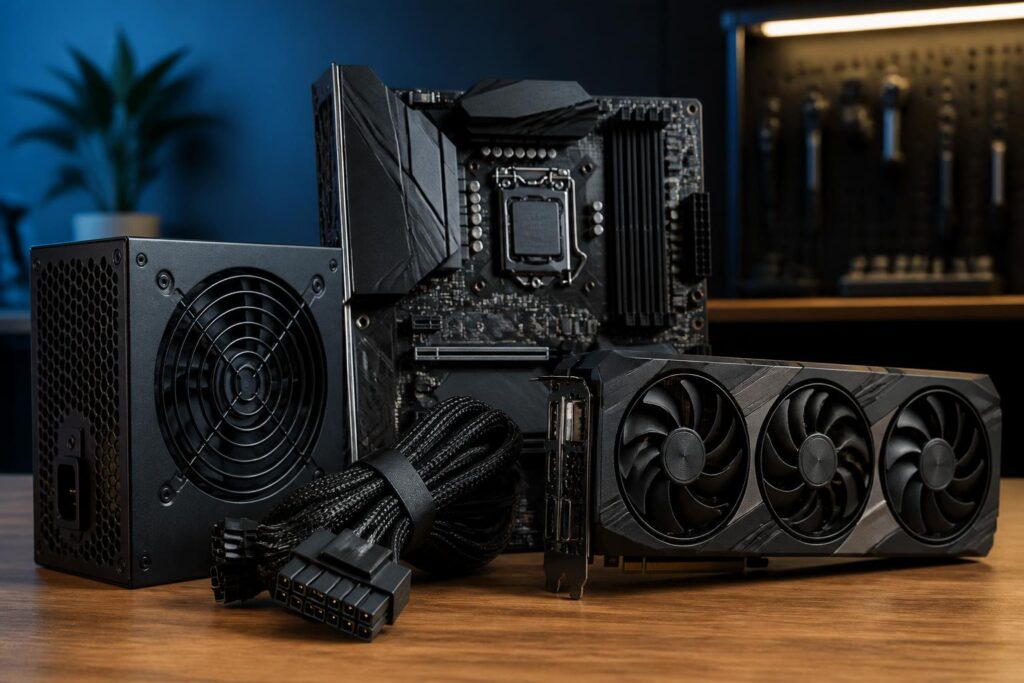
In a computer system, the power supply is often the least-noticed component. Users may spend a great deal of time comparing processors, graphics cards, RAM capacity, or SSD speeds, but then choose a power supply based on a wattage figure printed in large type on the box. This approach can easily lead to two opposite situations: buying a power supply that is too weak and causes system instability, or spending a lot of money on a power supply far beyond the system’s needs without receiving a proportional benefit.
The emergence of high-performance graphics cards makes power-supply selection something that needs to be considered even more carefully. Average power consumption is not the only concern; the system can also experience short bursts of increased load while gaming, rendering, or running intensive computing tasks. The ATX 3.1 standard emerged in this context, with clearer requirements for handling load fluctuations and connecting newer components. However, a power supply labeled ATX 3.1 is not automatically a good choice if buyers overlook other factors.
What problem does ATX 3.1 address?
ATX is a set of standards that guides the design and operation of computer power supplies. Newer versions typically update requirements related to efficiency, load handling, connectors, and compatibility with modern hardware. ATX 3.1 was developed to better suit systems with rapidly changing power demands, especially computers using powerful discrete graphics cards.
The feature users can most easily notice is the presence of a 12V-2×6 power connector on some newer power supplies. This connector evolved from the 12VHPWR connector used on earlier products. The new design aims to improve electrical contact and reduce the risk of incomplete insertion, although ultimate safety still depends on the quality of the cables, connectors, and installation technique. Users should not regard the standard’s name or the connector’s appearance as an absolute guarantee in every situation.
ATX 3.1 also places greater emphasis on the ability to handle short-duration power excursions. A graphics card may not continuously consume its maximum rated power, but it can still create significant load fluctuations when switching between idle and heavy-use states. A suitable power supply needs to maintain stable voltage, avoid shutting down unnecessarily, and not force users to rely on complicated cable-adapter setups.
Rated wattage is not the only criterion
Wattage is an important specification, but it only has meaning when considered in the context of the entire configuration. A system using an energy-efficient processor and a mid-range graphics card has very different needs from a computer with a many-core processor, a high-end graphics card, multiple storage drives, and several expansion devices. Therefore, a fixed wattage should not be treated as the answer for every configuration.
The first step is to estimate the power consumption of the processor and graphics card, as these are usually the two groups of components that account for most of the power budget. Next, add the motherboard, memory, storage drives, fans, and cooling pumps if present, as well as devices connected via USB. The allowance for headroom should be sufficient for the system to operate stably when the load changes, while also leaving room for moderate upgrades in the future.
Do not choose a power supply that is close to the estimated consumption level. When a power supply frequently operates near its limit, temperature, noise, and wear may increase. Conversely, a heavily oversized power supply is not always better. A device with very high wattage but poor quality can still produce unstable voltage, inadequate protection, or low efficiency. The reasonable goal is to choose a product with wattage appropriate for the configuration and belonging to a line with a reliable design.
Read the specifications instead of just looking at the certification label
Efficiency labels such as 80 PLUS are commonly used to describe power-conversion efficiency under certain test conditions. This is useful information, but it is not a comprehensive assessment of power-supply quality. Two power supplies with similar certification levels can still differ in circuit platform, components, voltage stability, noise levels, protection systems, and cable quality.
When reviewing specifications, buyers should pay attention to the power delivered on the 12V rail, as this is an important power rail for modern processors and graphics cards. A power supply with high total wattage but an unsuitable distribution may still fail to meet the actual configuration’s needs. Protection mechanisms such as overcurrent, overvoltage, undervoltage, overpower, short-circuit, and overtemperature protection also deserve attention. Not every sales page provides every detail, so finding official technical documentation and independent reviews from reliable sources is more useful than simply reading a few lines of advertising.
The quality of the internal components also affects lifespan and stability. Capacitors, control circuitry, cooling fans, component layout, and the design platform all help determine how the power supply responds to heavy loads. Ordinary users do not necessarily need to open the power supply to inspect it, as doing so is both dangerous and may void the warranty. Instead, prioritize manufacturers with transparent documentation, clear warranty policies, and a verified product history.
The 12V-2×6 connector and considerations when installing a graphics card
The new power connector helps reduce the number of cables that must be used for a graphics card while supporting power delivery through a more compact connection. However, this compactness does not mean users can install it carelessly. The plug must be inserted fully, with no unusual gap between the plug and the socket on the card. The cable should also not be bent too sharply near the connector, pulled taut, or pressed against the side panel of the case.
Before installation, shut down the computer, turn off the power switch, and unplug the power cord from the outlet. Inspect the connector to ensure there is no dust, obstruction, or sign of deformation. When routing the power cable to the graphics card, make a sufficiently wide curve rather than sharply bending it right at the plug. If the power supply comes with a dedicated cable for the graphics card, prioritize using that cable. Do not arbitrarily mix modular cables from different brands or different power-supply lines, because connectors that look similar do not guarantee that their internal pinouts are the same.
For power supplies without the new connector, the adapter included with the graphics card may be necessary, but it must be used according to the manufacturer’s instructions. The adapter cable should not be split arbitrarily, and all auxiliary plugs must be fully connected. If the cable is too short, difficult to route, or subjected to pulling force, replacing it with a fully compatible power supply is generally safer and neater.
Modular, semi-modular, or fixed cables?
A modular power supply allows users to connect only the cables they actually need. This helps improve airflow inside the case, reduce excess cabling, and make upgrades more convenient. A semi-modular power supply typically retains some basic cables, while a fixed-cable power supply has all of its cables permanently attached. In terms of operation, a modular design does not automatically make a power supply more powerful or more durable. This is primarily a difference in convenience and cable management.
The most important thing with a modular power supply is to use the included cables correctly. Modular power cables are not universally compatible across all manufacturers, even when the connectors on the outside look the same. Plugging in the wrong cable can damage storage drives, the motherboard, or the graphics card. When replacing a power supply, do not keep using the modular cables from the old unit unless the manufacturer clearly confirms compatibility.
When should you replace the power supply?
Some signs, such as the computer shutting down under heavy load, restarting unexpectedly, producing clearly audible electrical whining, or having the power-supply fan behave unusually, may be related to the power supply, but they are not enough to reach an immediate conclusion. The problem could also come from temperature, the motherboard, memory, the graphics card, or the power cables. If instability occurs, recheck the connections, clean out dust, monitor temperatures, and test individual components before buying replacements.
Even so, a power supply that is too old, no longer supports the connectors required by new hardware, or lacks reliable technical information should be considered for replacement, especially when the system is about to receive a graphics-card upgrade. Continuing to use a deteriorating, inexpensive power supply to protect expensive components is usually not the most economical choice.
A practical power-supply selection process
Start by recording the entire current configuration and the components that may be upgraded over the next few years. Next, estimate the power consumption of the processor and graphics card, add the power required by the remaining components, and include a reasonable amount of headroom. Then filter for products with suitable connectors, sufficient 12V-rail power, and a complete protection system.
At the final step, compare the official documentation, warranty terms, cable lengths, power-supply dimensions, and available space inside the case. If you frequently work at night, noise levels should also be considered. A good power supply is a product that suits the entire system, not merely the device with the highest wattage within the budget. Investing properly in a power supply helps the computer operate more reliably, makes upgrades easier, and reduces risks to the components on which you have already spent substantial amounts of money.
